Most of our customers have known for years that unencrypted “5250 sessions” are a security risk. So why do we still find unencrypted connections actively used in so many IBM i environments? I suppose it’s the “ostrich effect”. Although ostriches don’t actually bury their head in the sand, and neither do our customers (at least not for the most part), the metaphor is apt. Maybe they don’t know where to start, and since everything is “working” nobody wants to mess with it?! Let’s talk about how to check the status of 5250 telnet sessions on your IBM i system.
Why does it matter?
Its easy to capture unencrypted credentials on a network. Once someone has access to your network it becomes trivial to capture these details. The screenshot below is from a packet capture that I ran on an IBM i system, signed in over an unencrypted telnet using my password “terriblepassword123!”, and found my username and password inside the packet capture in plain text. This does not require highly sophisticated specialized knowledge, and if you and your users are using unencrypted 5250 sessions you are NOT safe.

Confirming TELNET encryption status
First, it’s important to know that IBM has provided us with a “transition” mode. That is, a mode where the server can support both unencrypted and encrypted 5250 telnet sessions. This is a huge boon! There is no need to have a high-stakes “cutover” where, if anything goes wrong, you find yourself with a meeting invite from your CTO or HR department. The migration from unencrypted to encrypted telnet can (and should) be staged or “rolled out”.
The first step is to take inventory. How is your system currently configured? There are a few ways to check, and various levels of detail that you may be interested in. You could type the “CHGTELNA” command on a command line and press F4 to bring up the prompt. Here you’ll see a parameter called “Allow Secure Socket Layer” at the bottom of the screen. If the value is displayed as *SAME you have insufficient authority. Try again with a more powerful user profile (the *IOSYSCFG special authority is required here). If the current value is *NO, this means that your system has not been configured to support encrypted telnet. If the current value is *YES it means that your system has been configured to support BOTH unencrypted AND encrypted telnet. This is the “transition” mode that I mentioned earlier. If the current value is *ONLY, congratulations, this means your system is already configured to allow ONLY secure telnet encrypted connections. No matter the current value, at this point you can “F3 out” from the CHGTELNA command.
What else might we want to know? Well first, there’s another way of checking the current value. Unfortunately there is no DSPTELNA command alternative to the CHGTELNA. When using the command we just have to be careful to “F3 out” when we’re done. However, there is an SQL view which can display the current setting. Here is a simple SQL query that utilizes the QSYS2.TELNET_SERVER_STATUS view (results shown in Figure 1). In the query itself we are using “CASE” to translate the potential *YES, *NO, and *ONLY values to be a bit more descriptive, but this is not strictly necessary.
--check the status of secure encrypted telnet

SELECT ALLOW_TRANSPORT_LAYER_SECURITY, CASE ALLOW_TRANSPORT_LAYER_SECURITY

       WHEN '*YES' THEN 'Encrypted telnet is allowed, but not enforced. Unsecure telnet may be active.'

       WHEN '*ONLY' THEN 'Encrypted telnet is required. Unsecure telnet is not active.'

       WHEN '*NO' THEN 'Encrypted telnet is not enabled.'

       ELSE 'error'

END AS SECURE_STATUS

FROM QSYS2.TELNET_SERVER_ATTRIBUTES; 
We can also use SQL to check whether any jobs are listening on ports 23 (unencrypted telnet) or 992 (encrypted telnet). Note these are the default ports for these services, and technically you could be running telnet on other “nonstandard” ports (results in Figure 2).
--Check the listening telnet ports

SELECT CASE LOCAL_PORT

       WHEN 23 THEN 'Unsecure telnet is listening.'

       WHEN 992 THEN 'Secure telnet is listening.'

   END AS SECURE_STATUS,

   LOCAL_PORT,

   IDLE_TIME

FROM QSYS2.NETSTAT_INFO

WHERE LOCAL_PORT IN (23, 992)

      AND TCP_STATE = 'LISTEN';
The “IDLE_TIME” can give you some clues here. In this example, although both ports are active and listening, the unsecure port has been idle for ~600 seconds, suggesting that someone connected to this port about 10 minutes ago. The secure port has been idle for 3,323 seconds which is roughly an hour.
It might also be helpful to check WHICH USERS are currently connected via unencrypted port 23 telnet. The following query allows you to do just that. The REMOTE_ADDRESS is the system from which the user is connecting – most likely the user’s laptop or workstation. Note that this is not a historical look at unencrypted telnet on your system, it is a snapshot or “moment in time” of which users are connected at the time that you run the query.
--Check which users (if any) are currently connected unencrypted

SELECT A.REMOTE_ADDRESS,

   A.LOCAL_ADDRESS,

   A.LOCAL_PORT,

   A.TCP_STATE,

   A.IDLE_TIME,

   B.JOB_NAME,

   B.AUTHORIZATION_NAME

FROM QSYS2.NETSTAT_INFO A

     JOIN QSYS2.NETSTAT_JOB_INFO B

         ON A.CONNECTION_TYPE = B.CONNECTION_TYPE

             AND A.LOCAL_PORT = B.LOCAL_PORT

             AND A.REMOTE_PORT = B.REMOTE_PORT

             AND A.LOCAL_ADDRESS = B.LOCAL_ADDRESS

             AND A.REMOTE_ADDRESS = B.REMOTE_ADDRESS

WHERE A.LOCAL_PORT = 23

      AND TCP_STATE = 'ESTABLISHED'

      AND AUTHORIZATION_NAME IS NOT NULL

      AND AUTHORIZATION_NAME <> 'QTCP';
Auditing secure connections
If you are in a risk-adverse environment and need to make sure everyone has switched to use an encrypted session before setting the telnet server to only allow encrypted communications, add *NETTELSVR and *NETSCK to the QAUDLVL system value. Then, after a few days, examine the SK audit journal entries for connections using port 23. If none are discovered, you should be good to make the change. If entries are listed, use the contents of the remote_socket_ip_address to do a reverse DNS lookup to determine where the connection is coming from. (Since these entries are generated before the job is established, the job name doesn’t provide the usual helpful information as you can see in the figure below.)
SELECT entry_timestamp,

       qualified_job_name,

       local_port,

       remote_socket_ip_address

 FROM TABLE (

  systools.audit_journal_sk(starting_timestamp => CURRENT TIMESTAMP - 7 DAYS)

        )

 WHERE entry_type = 'A'

       AND local_port = '23';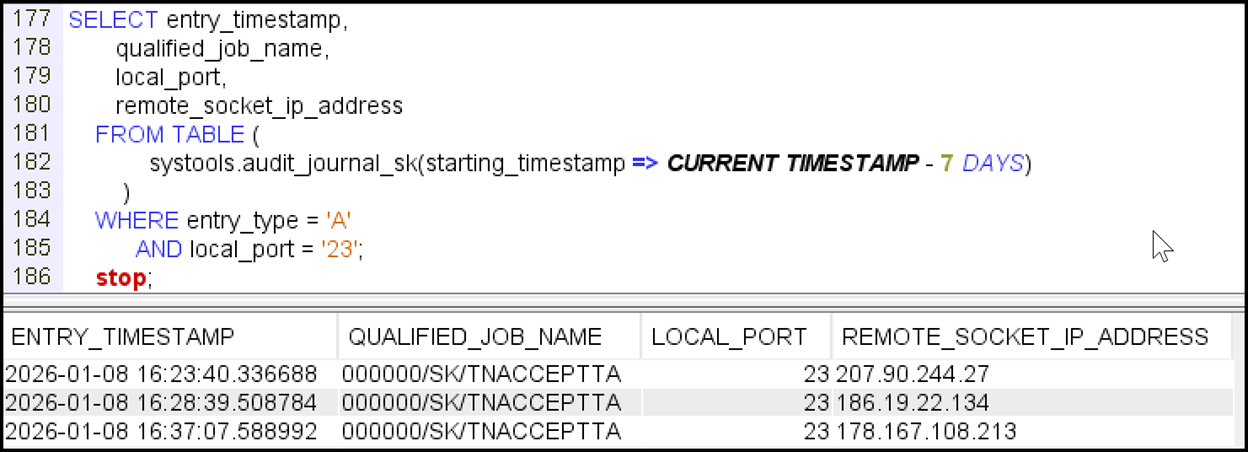
Once you’ve changed the telnet server to only accept secure (encrypted) communications, you may want to remove *NETTELSVR and *NETSCK from QAUDLVL if you had added them as they tend to generate a lot of audit journal entries.
If you’re ready to pull your head free of its sandy prison but you’re not confident about making this change yourself, feel free to contact Kisco Systems for help!
Contributed by:
Steve Riedmueller, IBM i Security Director
Carol Woodbury, IBM i Security SME
Kisco Systems
RELATED POSTS
BROWSE KISCO U
PRODUCT CONTENT

