While technology is progressing and passwords will, at some point, be a thing of the past, they are currently in widespread use and it’s imperative to the security of your organization that good password practices be implemented.
On IBM i this starts with the password level (QPWDLVL system value.) Figure 1 shows the password levels available as of IBM i 7.6.
| Level | Description |
| 0/1 | Default prior to IBM i 7.6 Character set: A-Z, 0-9, $, @, # and _ Maximum length: 10 LanMan password not stored at ANY level Since the LanMan password is no longer stored at any level, password level 0 is the exact same as password level 1 |
| 2 | Character set: Upper / lower case, all punctuation and special characters, numbers and spaces Maximum length: 128 Encrypts with old and new algorithms to accommodate both levels 0/1, 2/3 and 4 Sign on screen changed to accommodate longer password, as well as CHGPWD and CRT/CHGUSRPRF password field |
| 3 | Default as of IBM i 7.6 Same as level 2, Level 0/1 passwords removed Level 4 password generated and retained |
| 4 | New in IBM i 7.5 Stronger algorithm to generate password hash. Only version stored is the one that works at level 4* Required for IBM MFA starting with IBM i 7.6 *Note: Requires ACS 1.1.9.0 or higher |
Part of a good security practice demands that strong passwords be implemented. This is impossible to do at QPWDLVL 0 or 1. Moving to password level 2 and higher implements passphrases – the ability to specify a password that includes upper and lower case letters, any special character, numbers and even spaces! This, combined with the ability to specify a password longer than 10 characters greatly enhances the time it takes to conduct a brute force attack. But the key is really the length of the password. NIST provides this publication which emphasizes a simple, longer phrase (think a sentence) rather than a short, complex password as more secure. As a result, we highly recommend that, if your system’s at password level 0 or 1, you plan the move to password level 2. Once the system’s been at level 2 and no issues arise, move to level 3 then 4 if available.
Changes to QPWDLVL require an IPL. If you go directly to level 3 from 0/1 and you need to go back to level 0/1, you’ll have to IPL to level 2, reset users’ passwords then IPL to 0/1. (That’s why we recommend you go to level 2 first.) Also, you cannot jump from 0/1 directly to 4. You must first go to level 2 or 3.
Moving from QPWDLVL 0/1 to a higher level is doable but takes planning. If you need assistance, our services team can help you. Please contact us for more information.
Password Composition Rules
The next system value to be configured defines your password rules. In other words, its length, whether it requires a number and so forth. In the past, these rules were defined by individual system values (QPWDMINLEN for example). While these values still exist, we recommend you use QPWDRULES instead. QPWDRULES provides many more options than the individual system values and will likely allow you to match the password composition rules required by the rest of your organization. Our recommended values are:
Once you change QPWDRULES from the default *PWDSYSVAL, only QPWDRULES will be examined when a password is changed and the individual password rule system values will be ignored. So be sure to put ALL rules in QPWDRULES!
Notes:
Other Password-related System Values
There are still a handful of individual password system values that need to be set. Here are the descriptions and our recommendations:
|
|
|
|
| QPWDEXPITV (How often a password is required to be changed) | 180 | If adhering to NIST recommendations of longer passphrases, passwords do not need to be changed as often Note: This value can be overridden in the user profile. |
| QMAXSIGN (How many times a user can attempt to enter a valid password) | 3-5 | Note: This value can be overridden in the user profile |
| QMAXSGNACN (Action taken when number of invalid passwords is reached) | 2 (disable the user profile) or 3 (disable both user profile and device) | Choose an option that disables the user profile. Disabling only the device unless using named devices is pointless in today’s world of virtual devices |
| QPWDCHGBLK (How soon a password can be changed) | 24 (hours) | Prevents repeatedly changing a password to get back to the original Note: This value can be overridden in the user profile |
| QPWDEXPWARN (How soon users are warned that their password has to be changed | 7 (days) |
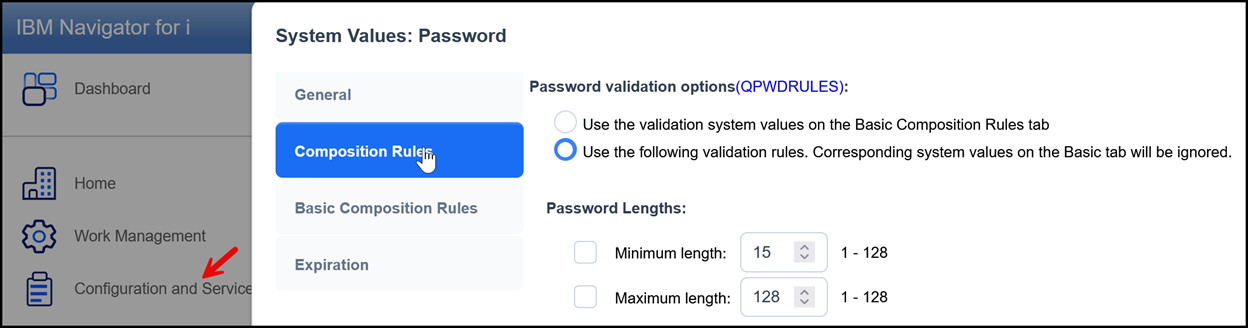
The easiest way to manage all password system values is to use Navigator for i. Log in, then Configuration and Service-System Values-Password
Contributed by:
Carol Woodbury
IBM i Security SME
Kisco Systems
RELATED POSTS
BROWSE KISCO U
PRODUCT CONTENT

