One part of an effective security strategy is to ensure you’re effectively managing user accounts. On IBM i that means managing user profiles. One aspect of this management is to have a process in place that identifies and removes profiles that are no longer in use. At least two reasons demand this. First, a popular social engineering attack is to contact an organization’s help desk and, with a sense of urgency, asks for a profile to be re-enabled. The profile often belongs to a former employee. Once the profile has been re-enabled and the password reset, the bad actor uses the profile to exploit whatever privileges the former employee had. In addition, eliminating unused profiles will save time when you run SAVSECDTA (Save Security Data) and more importantly, save critical time restoring profiles should you have to recover your system.
While you could pour through all of the user profiles and analyze their use manually, IBM i Services have made this task much easier.
Step #1: Identifying inactive profiles
The first step in this process is to identify the inactive profiles, that is, profiles that haven’t been used in a specified time. Many organizations have an ‘aging’ process. For this article we’ll use the following (yours may be different): Profiles not used in 30 days will be set to disabled and profiles not used for 60 days will be removed from the system. Of course, there are exceptions and we’ll discuss those along the way.
SELECT user_name,
date(last_used_timestamp) as last_used,
timestamp(previous_signon, 0) as last_signon,
timestamp(creation_timestamp, 0) as create_time,
status,
text_description
FROM QSYS2.USER_INFO
WHERE (last_used_timestamp IS NULL
OR last_used_timestamp < CURRENT TIMESTAMP - 1 MONTHS)
AND (creation_timestamp < CURRENT TIMESTAMP - 1 MONTHS);
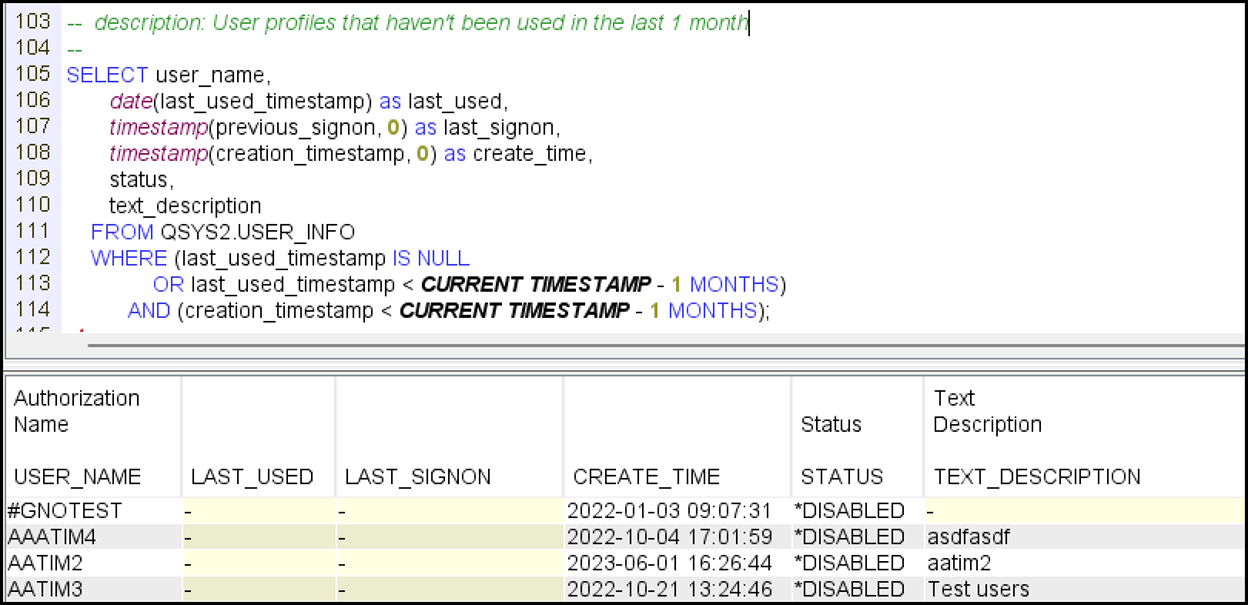
Figure 1
Notes regarding Figure 1:
Step #2: Disable the Profiles
Now that the inactive profiles have been identified, the next step is to take action so they can’t be used without some type of intervention. The typical action is to set the profile to status of *DISABLED. You can do that ‘by hand’ using CHGUSRPRF (Change User Profile) but IBM has provided a function that allows us to take action using SQL.
SELECT cup.*
FROM QSYS2.USER_INFO u,
TABLE (
SYSTOOLS.CHANGE_USER_PROFILE(P_USER_NAME => USER_NAME,
P_STATUS => '*DISABLED',
P_TEXT => 'Careful - do not re-enable',
PREVIEW => 'YES')
) cup
WHERE (u.user_name NOT IN (SELECT aidprf
FROM QUSRSYS.QASECIDL))
AND ((last_used_timestamp IS NULL
OR last_used_timestamp < CURRENT TIMESTAMP - 1 MONTHS)
AND (creation_timestamp < CURRENT TIMESTAMP - 1 MONTHS));
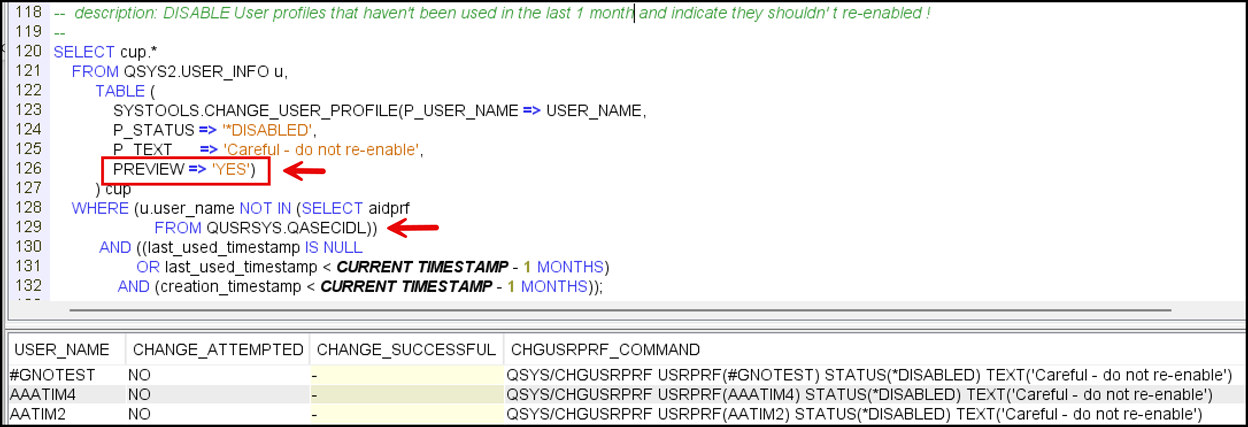
Figure 2
Notes regarding Figure 2:
Step #3 – Deleting the Profiles
After letting the profiles stay on the system another 30 days (60 inactive days total), it’s time to remove them from the system. You may want to delete profiles ‘by hand’ using DLTUSRPRF (Delete User Profile) or you can use this SQL
DO NOT RUN THIS SQL until you’re ready to delete profiles!!!
--
- Delete User profiles that are at least 2 months old and have not been
-- used in the last 2 months
-- Reassign ownership of any object to the user's first group
-- If the user has no group assign object ownership to the profile TEMP_OWN
-- If the user profile is in the "do not delete list", skip it
--
SELECT qsys2.qcmdexc('DLTUSRPRF USRPRF(' concat user_name concat ') '
concat 'OWNOBJOPT(*CHGOWN ' concat
case GROUP_PROFILE_NAME when '*NONE' then 'TEMP_OWN'
else GROUP_PROFILE_NAME end concat ')' )
FROM QSYS2.USER_INFO u
WHERE (coalesce(last_used_timestamp, previous_signon, current timestamp - 2 months) < CURRENT TIMESTAMP - 2 MONTHS)
AND (creation_timestamp < CURRENT TIMESTAMP - 2 MONTHS)
AND (user_creator not in ('*IBM', 'QLPINSTALL', 'QSYS', 'QSECOFR'))
AND u.user_name not in (select aidprf from QUSRSYS.QASECIDL);
Figure 3: DO NOT RUN THIS SQL until you’re ready to delete profiles!!!
Notes regarding Figure 3:
If you’ve never sorted through inactive profiles or it’s been a while, this may be a bit of a project. But we encourage you to persevere and then set this up as a regular task to protect your system from an attacker abusing one of these profiles.
iEventMonitor from Kisco Systems
With iEventMonitor, you can automatically receive alerts for expiring user profiles as well as alerts for all activity related to specific user profiles.
Contributed by:
Carol Woodbury
IBM i Security SME
Kisco Systems
RELATED POSTS
BROWSE KISCO U
PRODUCT CONTENT

