Visibility is everything in the age of AI. This is a message you'll be hearing a lot from the IBM i security team at Kisco. As more and more "human out of the loop" transactions occur, it becomes vitally important for customers to see who is doing what in their data.
Enterprise reporting and data analytics platforms like Grafana or Data Dog offer customers the ability to combine data from disparate sources into unified views. IBM i's native SQL service makes this easy. Combining IBM i SQL with Kisco's data-tracking software, iFileAudit, gives customers unprecedented visibility into how their sensitive data is being accessed and updated.
iFileAudit tracks changes in critical or sensitive database fields by extracting transaction details from native IBM i database journal receivers. These changes are stored in a separate, persistent relational database, providing an easy way for admins and auditors to analyze and report on transactions at the user, program or database level.
iFileAudit has built-in audit reports, but what if you want to an perform your own analysis, or add data-tracking summary analytics to your security visibility dashboard? You can do all of this with built-in IBM i SQL services.
Here's how SQL can summarize data-tracking activity across multiple journal receivers:
Combine iFileAudit members
The iFileAudit database is a multiple member database file named FAANZDTL in library FILAUD. Each member contains the information for one file that is being tracked in IFA.
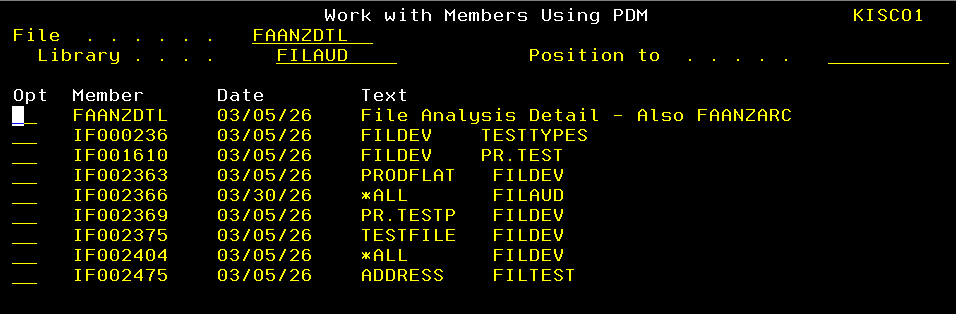
You need to combine these members into a logical file if you want to summarize all your tracking data in one report.
Step 1 is to create a logical file definition in DDS. This is in a source member in a source physical file. Here we are creating FAANZALL in file QSRC in library FILDEV:

This LF needs to be keyed. For this demo we chose to index by date and time. It could just as easily be keyed by library name and file name.
Step 2 is to then just create the view from the source and make sure that all members are included in the view. With the library FILAUD included in the session library list (ADDLIBLE FILAUD) the following command will create the logical view:
CRTLF FILE(FILAUD/FAANZALL) SRCFILE(FILDEV/QSRC) SRCMBR(FAANZALL) MBR(*FILE)

DTAMBRS(*ALL)
Now we can report across all our journal data in one place with one SQL statement.
NOTE: Since release 8.1 iFileAudit ships with this logical file in place, along with built-in summary reporting. See this article for more information.
Exploring iFileAudit data
Now that all our members are in one logical file, let's browse the raw data:
SELECT * FROM FILAUD.FAANZALL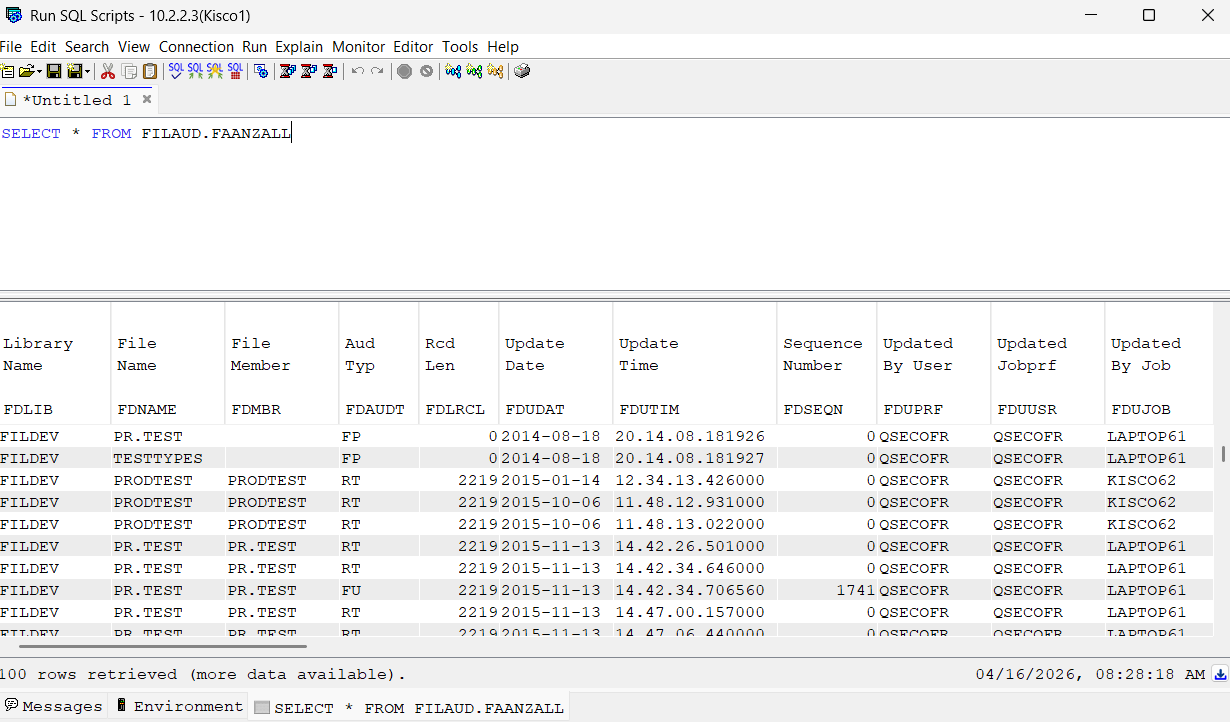
Interpreting iFileAudit transaction codes
You'll see that column "FDSUDT" is a two-character code describing the transaction.
These code definitions are stored in an iFileAudit table:
select * from filaud.filaudcHere is the complete list as of this article's publication date:
| CL | File Close |
| CR | Clear File Member |
| DF | Delete file |
| DL | Delete record |
| DM | Delete Member |
| DR | Rollback delete |
| EF | End Journal File |
| EJ | End Journal Member |
| FA | File record add |
| FN | File rename |
| FP | iFileAudit Purge Run |
| FU | Field update |
| JF | Start Journal File |
| JM | Start Journal Member |
| MD | Member delete |
| MN | Member rename |
| OP | File Open |
| RT | Read Trace |
| RU | Rollback update |
Summary report by member
NOTE: iFileAudit captures data down to the field level. This has potential implications when determining counts of record-level transactions. For example, one "record add" action can result in multiple entries if there are multiple fields affected by the transaction (which is very common). Therefore, it is necessary to "collapse" field-level entries to get an accurate record count. iFileAudit includes a sequence number field which can be used for this purpose. The example SQL statements shown below are performing this collapse utility to accurately differentiate between record-level actions and field-level actions.
This SQL shows transaction counts by type, in separate columns, for each receiver being monitored by iFileAudit
SELECT CURRENT SERVER AS "SystemName",

    FDLIB AS "File Library",

    FDNAME as "File Name",

    COUNT(DISTINCT CASE WHEN FDAUDT = 'FA' THEN FDSEQN END) AS "Records Added",

    COUNT(DISTINCT CASE WHEN FDAUDT = 'DL' THEN FDSEQN END) AS "Records Deleted",

    COUNT(DISTINCT CASE WHEN FDAUDT = 'FU' THEN FDSEQN END) AS "Records Updated",

    SUM(CASE WHEN FDAUDT = 'FU' THEN 1 ELSE 0 END) AS "Fields Updated",

    SUM(CASE WHEN FDAUDT NOT IN ('FU','DL','FA') THEN 1 ELSE 0 END) AS "Other"

FROM FILAUD.FAANZALL

WHERE FDNAME <> ''

AND FDUDAT > CURRENT DATE - 7 DAYS

GROUP BY CURRENT SERVER, FDLIB, FDNAME

ORDER BY CURRENT SERVER, FDLIB, FDNAME;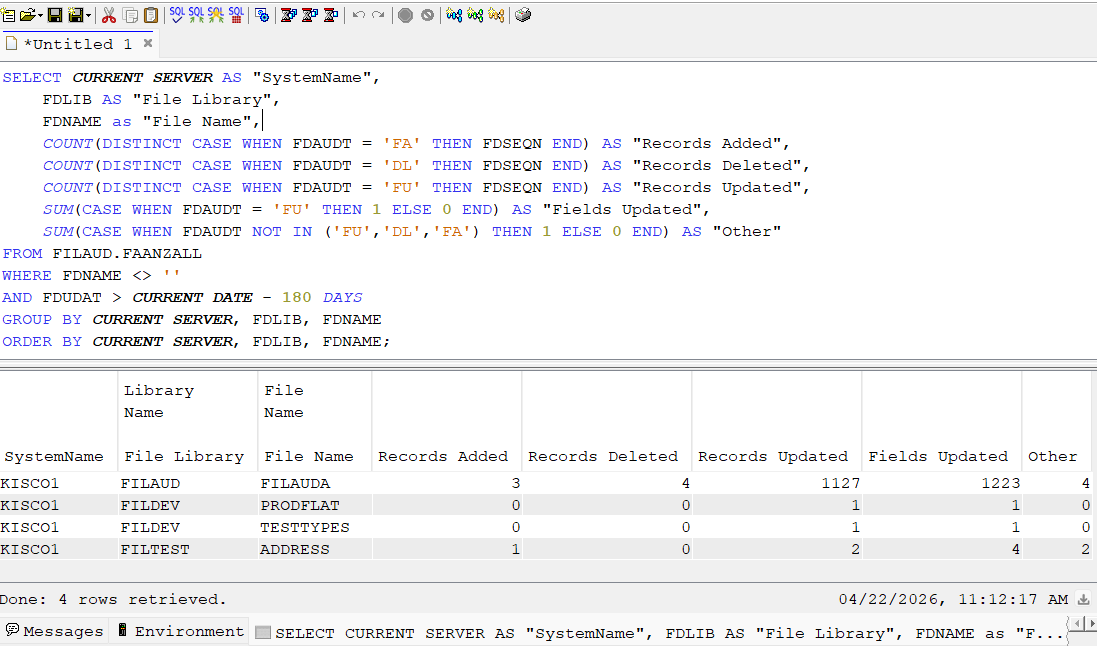
Please note we added a custom column called "SystemName" to be used if we want to aggregate reports across multiple LPARs.
Reporting by user
We can use a similar query to look at activity by user:
SELECT CURRENT SERVER AS "SystemName",

    FDUUSR AS "User",

    FDLIB AS "File Library",

    FDNAME AS "File Name",

    COUNT(DISTINCT CASE WHEN FDAUDT = 'FA' THEN FDSEQN END) AS "Records Added",

    COUNT(DISTINCT CASE WHEN FDAUDT = 'DL' THEN FDSEQN END) AS "Records Deleted",

    COUNT(DISTINCT CASE WHEN FDAUDT = 'FU' THEN FDSEQN END) AS "Records Updated",

    SUM(CASE WHEN FDAUDT = 'FU' THEN 1 ELSE 0 END) AS "Fields Updated",

    SUM(CASE WHEN FDAUDT NOT IN ('FU','DL','FA') THEN 1 ELSE 0 END) AS "Other"

FROM FILAUD.FAANZALL

WHERE FDNAME <> ''

AND FDUDAT > CURRENT DATE - 7 DAYS

GROUP BY CURRENT SERVER, FDUUSR, FDLIB, FDNAME

ORDER BY CURRENT SERVER, FDUUSR, FDLIB, FDNAME;
Privileged user tracking
This is where IBM i SQL services get really powerful. We can combine iFileAudit data with native IBM i SQL services to bring additional context to our tracking data. In this case, we want to see a summary report of database transactions that were performed by an *ALLOBJ profile.
This SQL joins iFileAudit's user profile column with the QSYS2 user_info function to summarize transactions for powerful profiles:
SELECT CURRENT SERVER AS "SystemName",

    FDUUSR AS "User",

    FDLIB AS "File Library",

    FDNAME AS "File Name",

    COUNT(DISTINCT CASE WHEN FDAUDT = 'FA' THEN FDSEQN END) AS "Records Added",

    COUNT(DISTINCT CASE WHEN FDAUDT = 'DL' THEN FDSEQN END) AS "Records Deleted",

    COUNT(DISTINCT CASE WHEN FDAUDT = 'FU' THEN FDSEQN END) AS "Records Updated",

    SUM(CASE WHEN FDAUDT = 'FU' THEN 1 ELSE 0 END) AS "Fields Updated",

    SUM(CASE WHEN FDAUDT NOT IN ('FU','DL','FA') THEN 1 ELSE 0 END) AS "Other"

FROM FILAUD.FAANZALL

WHERE FDNAME <> ''

AND FDUDAT > CURRENT DATE - 7 DAYS

AND FDUUSR IN

    (SELECT authorization_name

        FROM qsys2.user_info_basic

        WHERE authorization_name IN ('QSECOFR', 'QSYSOPR')

            OR special_authorities LIKE '%*ALLOBJ%'

            OR authorization_name IN (SELECT user_profile_name

                FROM qsys2.group_profile_entries

                WHERE group_profile_name IN (SELECT authorization_name

                    FROM qsys2.user_info_basic

                    WHERE special_authorities LIKE '%*ALLOBJ%')))

GROUP BY CURRENT SERVER, FDUUSR, FDLIB, FDNAME

ORDER BY CURRENT SERVER, FDUUSR, FDLIB, FDNAME;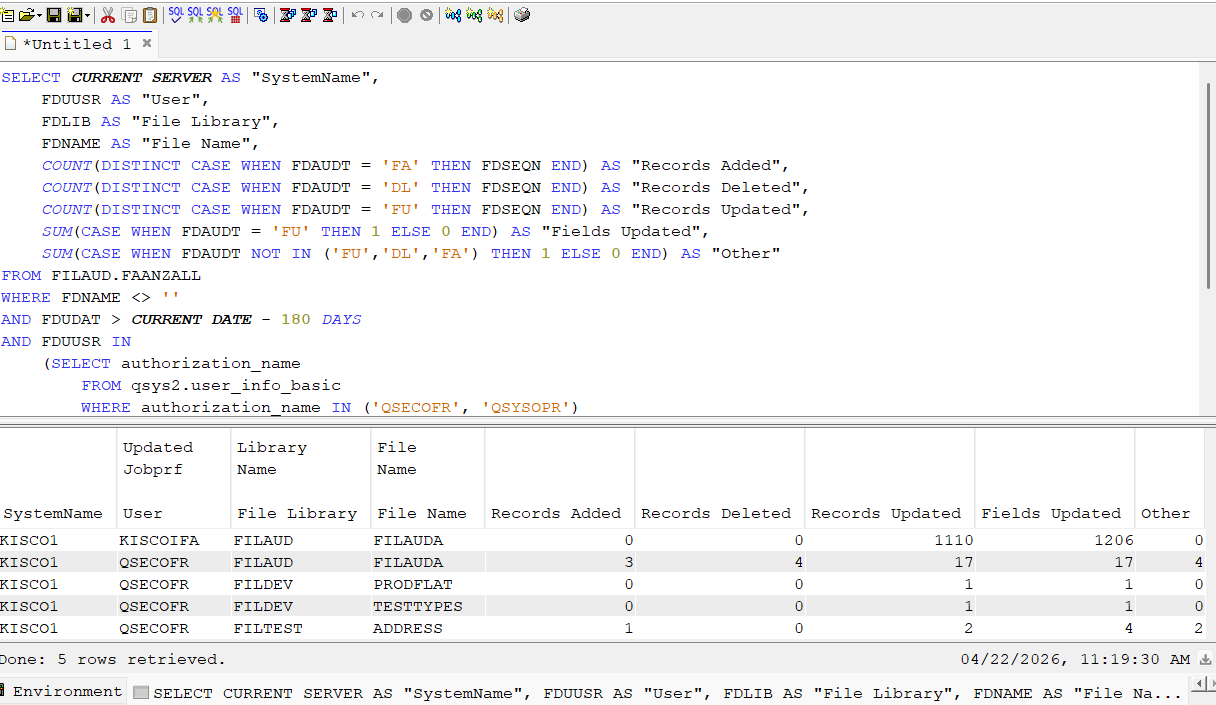
Getting started...
If you already own iFileAudit, you can file up ACS right now and try some of these queries yourself.
The Kisco Systems services team is always here to help you setup and deploy security analytics and dashboards. Please contact us for more information.
If you don't have iFileAudit then click here for more information and to start a free trial.
RELATED POSTS
BROWSE KISCO U
PRODUCT CONTENT

